In today’s digital world, you may have heard the phrase “show up where your customers are searching” if you’ve been running a business. Google Ads lets you do just that, and it does it better than almost any other paid channel.
Google Ads can help you get more calls, get people to your website, sell things online, or just get your brand in front of the right people. This guide tells you everything you need to know, from what Google Ads is to how the auction works to how to set up your first campaign and understand the metrics that matter.
What Is Google Ads?
Google Ads is Google’s online advertising service. It lets businesses put ads on Google Search, YouTube, Gmail, and millions of other sites in the Google Display Network. Pay-per-click (PPC) advertising is a type of Paid advertising where you only pay when someone takes an action, such as clicking your ad.
When it first came out in 2000, the platform was called Google AdWords. In 2018, Google changed the name to Google Ads to better show how much it has grown beyond just search text ads.
Google Ads now supports a number of formats, such as display ads, shopping ads, video ads, app campaigns, and more. We’ll talk about each one below, but they all have different business goals.
How Google Ads Works: The Intent Edge
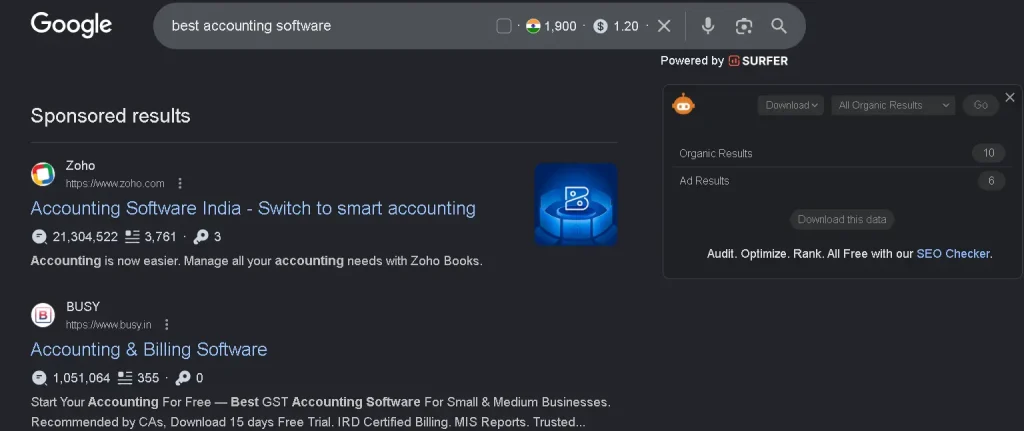
This is what sets Google Ads apart from almost all other ad platforms. If you send a message on Facebook or Instagram, you’re interrupting someone who was looking at pictures of their friends. You show up on Google Search right when someone types in “best running shoes under 3000 rupees” or “plumber near me open now.”
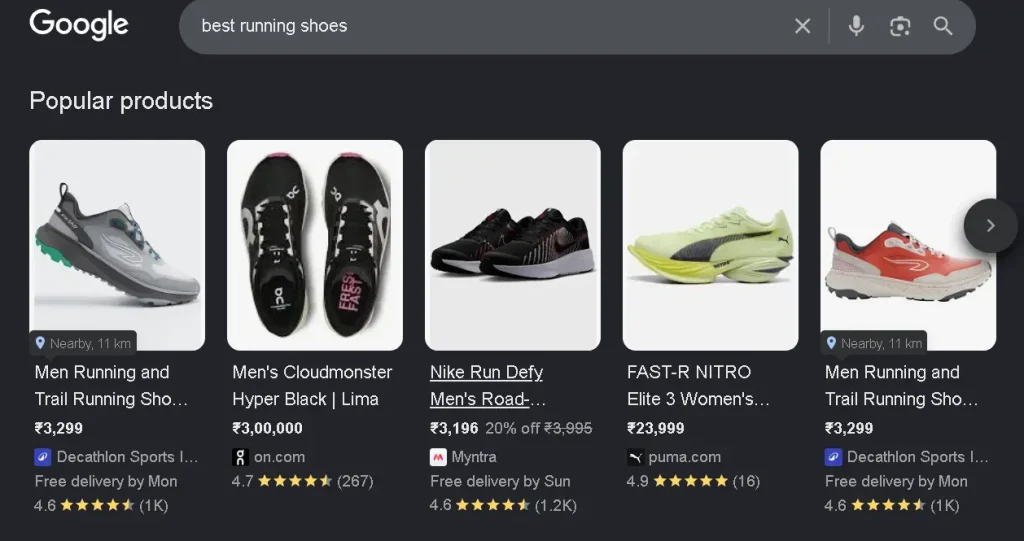
That’s what you want. And in advertising, intent is everything.
People who use Google are already looking for something. Your ad is the answer. That’s why Google Ads has some of the best conversion rates of any digital channel: you’re not trying to get people to want something. You only meet them when they are already there.
Top 10 Ways Google Ads Can Help You Advance Your Business Goals
1. Increase online visibility instantly
SEO can take months to show results, but Google Ads puts you at the top of search results right away. Once your campaign goes live, your ad can show up when someone searches for your keywords. It’s really hard to get that kind of instant visibility for a new business or product launch.
2. Drive highly targeted traffic
You can’t find targeting like this anywhere else but Google Ads. You can target by keyword, location, device, time of day, language, and even specific groups of people. If you own a gym in South Delhi and want to reach working professionals between the ages of 25 and 40 who are looking for a “personal trainer near me,” you can do that.
3. Build brand awareness
Even if people don’t click on your ad, they will see your brand name at the top of their search results. Repetition makes things more familiar, and familiarity builds trust. People will think of your business first when they are finally ready to buy because they see it so often.
4. Get good leads
Google Ads brings in leads who are much further along in the buying process than most other traffic sources because it targets people who are looking for what you sell. Over time, a well-optimized campaign with a strong landing page can cut your cost per lead by a lot.
5. Drive online and offline sales
Google Ads isn’t only for online stores. Local businesses use it to get people to come into their stores by using location-based ads, call extensions, and Google Maps integration. You can literally set up an ad that shows your store address and a button to call you to someone who is 2 kilometers away and looking for your type of product.
6. Get in touch with customers at every step of the funnel
You can set up Google Ads campaigns to reach people who are just learning about a problem, actively looking for solutions, or ready to buy right away. A Display campaign at the top of the funnel is how people learn about your brand. A Search campaign at the bottom of the funnel seals the deal.
7. Take full control of your budget
You don’t have to spend a certain amount on Google Ads. You make a daily budget and stick to it. You can start with ₹500 a day and then increase the amount as you see results. This makes it easy for small businesses to use and big businesses to grow.
8. Measure everything that matters
You can see every click, every action, and every rupee spent. You know exactly what you’re getting for your money, unlike a newspaper ad or a billboard. Google Ads works directly with Google Analytics to show you everything that happens after someone clicks on your ad, including which pages they visit, how long they stay, and whether they buy something or ask a question.
9. Advertise locally or globally
Google Ads makes it easy to reach customers in one city or across the country or even around the world. You can target a wide area, like a whole country, or a very small area, like a 5-kilometer radius around your store.
10. Gain a real competitive edge
If your competitors are using Google Ads and you aren’t, they are getting clicks that could have been yours. And if they haven’t started running ads yet, you have a chance to take over the top of the search results in your field before they do.
What are the Types of Google Ads Campaigns
Google Ads offers many campaign types, each suited to different goals. Here’s how they compare:
| Campaign Type | Ad Format | Where It Appears | Best For |
| Search | Text ads | Google Search results | Leads, sales, website traffic |
| Display | Websites in the Google Display Network | Websites in Google Display Network | Brand awareness, retargeting |
| Shopping | Product image + price | Google Search (product listings) | E-commerce product sales |
| Video | Video ads | YouTube and Google video partners | Brand awareness, product demos |
| App | Various formats | Google Search, Play Store, YouTube | App installs and in-app engagement |
| Smart | Automated mixed formats | Across Google properties | Small businesses and beginners |
| Performance Max | All formats combined | All Google channels simultaneously | Maximising conversions across channels |
| Local | Mixed | Google Search, Maps, Display | Driving in-store visits and phone calls |
For most businesses getting started, Search campaigns are the best place to begin. You’re reaching people with direct intent, and you have full control over your keywords and bids.
How Does the Google Ads Auction Work?
Many people think that Google only shows the ad from the person who bids the most. That’s not how it works, and knowing the difference is very important if you want to get good results without spending too much.
Google holds an instant auction for all advertisers who want to show up for that keyword every time someone searches for it. Your bid alone doesn’t decide your place in that auction. Ad Rank is what decides it.
Ad Rank = Bid × Quality Score × Expected Impact of Ad Extensions
This means that a smaller advertiser with a very relevant, well-written ad can beat a bigger advertiser who is bidding more but has a poorly optimized campaign. That’s really good news for small and medium-sized businesses that are up against bigger ones.
How to Run Google Ads: A Step-by-Step Setup Guide
Here’s a step-by-step guide on how to set up and run your first Google Ads campaign if you’re ready to get started.
Step 1: Create your ad account
To use ads.google.com, you need to sign in with a Google account. You will be shown how to set things up in a simple way. If Google asks you if you want to make a “Smart Campaign” automatically, say no and choose Expert Mode instead. If you want real, optimizable results, Smart Campaigns aren’t for you because they don’t give you much control.
Step 2: Define your campaign goal
Google Ads asks you to choose a goal up front. Pick based on what you actually want to happen:
| Goal | What It Optimises For |
| Sales | Purchases and transactions |
| Leads | Form fills, calls, sign-ups |
| Website traffic | Clicks and visits |
| Brand awareness | Reach and visibility |
| App promotion | Installs and engagement |
Step 3: Choose your campaign type
Start with Search if you’re new. It gives you the most control and gets you the most measurable results based on your goals.
Step 4: Set your budget and bidding strategy
Begin with caution. In most Indian markets, you can get useful information with a daily budget of ₹500 to ₹1,000. At first, choose Maximize Clicks. After you’ve gathered enough data (usually 30 or more conversions over 30 days), switch to a conversion-based strategy.
Step 5: Do keyword research
Use Google’s Keyword Planner to find keywords that get a lot of searches but aren’t too hard to rank for. Use exact match and phrase match keywords to start. You can add broad match keywords later when you know how your audience really searches.
At this point, you should also make a list of negative keywords. Even 20–30 negatives at launch can save a lot of money from the start.
Step 6: Create your ads
There should be one Responsive Search Ad (RSA) for each ad group, and it should have at least 10 headlines and 4 descriptions. Google automatically tests different combinations and figures out which ones work best for your audience.
How to write better ads:
- Instead of saying “We offer PPC Services,” say “Get 3x More Leads.”
- Make sure at least one of your headlines has your main keyword in it.
- Include a clear, direct call to action, like “Book a Free Call” or “Get an Instant Quote.”
Whenever you can, use numbers and specifics, like “₹499/month” or “Trusted by 2,000+ Businesses.”
Step 7: Set up conversion tracking
Check that conversion tracking is working before you publish. Click on Tools, then Conversions, and set up the action that matters most to you. You can either use Google Tag Manager or put the Google tag on your website. You can’t optimize properly without this in place; you’re basically flying blind.
Step 8: Add ad extensions
Ad extensions are free extras that let people interact with your ad in more ways and give Google more information about your business. Always add:
| Extension Type | What It Shows |
| Sitelink | Additional links to specific pages on your site |
| Callout | Short benefit highlights (“Free Shipping”, “24/7 Support”) |
| Call | Your phone number with tap-to-call on mobile |
| Location | Your address and a map link |
| Price | Starting prices for your services or products |
| Lead form | A contact form directly on the search results page |
Step 9: Start and keep an eye on
Check your campaign every day for the first two weeks after it becomes live. Be mindful of:
- Search terms report: To identify irrelevant queries and include them as negatives, use the search terms report.
- Click-through rate by keyword: A way to spot ineffective or inconsistent advertising copy
- Conversion rate by campaign: Campaign-specific conversion rate to determine what is truly effective
- Cost per conversion: The most crucial efficiency statistic for you is cost per conversion.
Step 10: Continue to optimise
Google Ads are never “set and forget.” The best-performing accounts are routinely examined; bids are modified, underperforming keywords are halted, fresh ad copy is tested, and targeting is improved based on actual data. It will be quite beneficial to set aside some time each week for this.
How to Create a Google Ads Campaign That Actually Converts
Advertising is one thing. Developing a conversion-oriented campaign is another. These factors distinguish successful campaigns from those that merely waste money.
- Match your landing page to your ad. If your ad says “Affordable Chartered Accountants in Mumbai,” the page people land on should be specifically about that — not your homepage. You lose conversions every time there is a disconnect between the landing page and the advertisement.
- Keep your ad groups tightly themed. Every advertising group ought to concentrate on a single subject or item. It is impossible to produce ad content that is appropriate to every ad group when irrelevant keywords are mixed together.
- Test ad copy regularly. At every given moment, run a minimum of two headline variations. You’ll have enough information over the course of four to six weeks to determine which messages are successful and which are unsuccessful.
- Use audience layers. In addition to keywords, you may prioritise your spending by overlaying audience targeting, such as in-market audiences, customer match lists, and comparable audiences.
Every week, review the report on search phrases. The exact searches that led to your adverts are displayed in this report. It’s the quickest method for identifying wasteful spending and simultaneously finding new keyword prospects.
Google Ads vs SEO: Which One Should You Prioritise?
This is one of the most common questions businesses ask, and the honest answer is: both, but at different times and for different reasons.
| Factor | Google Ads | SEO |
| Time to results | Immediate (same day) | Months (typically 3–12) |
| Cost model | Pay per click | Time and content investment |
| Longevity | Stops when budget stops | Builds long-term organic traffic |
| Control | High — targeting, timing, budget | Limited — dependent on content and Algorithm |
| Best for | Stops when the budget stops | Long-term authority and sustained traffic |
| Visibility | Top of page (paid section) | Organic listings below paid ads |
| Data feedback | Rich, immediate performance data | Slower feedback loop |
Most of the time, the businesses that win online use Google Ads to get quick results while also working on their SEO. Your Google Ads data is also great for your SEO strategy. You can see which keywords are converting and then make organic content around those same keywords.
Common Google Ads Mistakes to Avoid
Even experienced marketers make these. Avoiding them from the start will save you a lot of wasted budget.
| Mistake | Why It Costs You | Fix |
| Using broad match without negative keywords | Ads show for completely unrelated searches | Start with exact and phrase match; add negatives |
| Sending traffic to the homepage | Generic pages don’t convert | Build dedicated landing pages per campaign |
| Not setting up conversion tracking | No visibility into what’s actually working | Set this up before your campaign goes live |
| Setting it and forgetting it | Performance degrades without regular attention | Review weekly, optimise monthly |
| Ignoring the search terms report | Irrelevant clicks silently drain your budget | Check weekly and add negatives accordingly |
| Running only one ad per group | No ability to test or improve messaging | Run 2–3 ads per group and test variations |
| Optimising for low CPC instead of low CPA | Cheap clicks that never convert to customers | Focus on cost per conversion, not cost per click |
Frequently Asked Questions
How can Google Ads help you advance your business goals?
Google Ads helps you reach your business goals by getting people to buy things online, in apps, in person, and over the phone. It also helps people learn about your brand and changes the way they think about your products and services—all through targeted, measurable paid advertising.
How much does it cost to use Google Ads?
There isn’t a set price. You decide how much money you want to spend each day, and you only pay when someone clicks on your ad. CPCs in India can be as low as ₹5 or as high as ₹500 or more, depending on your industry and how competitive your target keywords are.
Can Google Ads work well for small businesses?
Yes, for sure. Google Ads’ ability to target specific customers often gives small businesses a big edge over bigger competitors who use broad, untargeted advertising. Even a ₹10,000/month budget can get great results in a small niche if the campaign is well-organized and the offer is clear.
How long will it take for Google Ads to show me results?
You can see traffic right away when your campaign goes live. It usually takes 2 to 4 weeks for meaningful optimization data to build up. After the first 60 to 90 days, campaigns usually get a lot better as you gather conversion data and improve your targeting.
Do Google Ads affect my SEO rankings?
No, running paid ads does not directly help your organic search rankings. This is very clear from what Google has said. But the performance data from your campaigns is very helpful for planning your SEO content.
What is the difference between Google AdWords and Google Ads?
They are both on the same platform. In July 2018, Google changed the name of Google AdWords to Google Ads to better show that it offers more than just search text ads.
Do I need an agency to manage Google Ads, or can I do it myself?
You can run Google Ads on your own because the platform is self-serve, and Google gives you good information to help you learn. That being said, it takes a lot of time to learn, and mistakes made early on can cost a lot. Many businesses find that hiring a certified expert to help them set up and run their first few months of campaigns pays off in the form of much better results.
How do I choose the best performance marketing agency in Delhi?
To find the best performance marketing agency in Delhi, focus on finding the one that understands your business goals, works within your budget, and shows real results, not just fluff. Agencies like MyFirstAd or AdLift are good options, but always check their past work first.
Conclusion
Google Ads is all about control: control over who sees your business, when they see it, and how you turn that attention into real results. It puts your brand right in front of people who are already looking for what you offer, instead of making them wait for you to find them.
You can’t just run campaigns and expect to do well with Google Ads. You have to use data to make better choices, improve your strategy over time, and make sure that every campaign has a clear business goal. If you do it right, it becomes more than just paid ads; it becomes a reliable way to get leads, make sales, and predictably grow your business.
Google Ads is no longer an option if you want to grow faster, compete better, and measure the results of your marketing efforts. You can connect with Myfirstad.