

Not long ago, checking your brand’s online presence meant opening a rank tracker and seeing where your page landed on Google. That’s no longer the full picture. A lot of people now read an AI-generated answer first, and your brand either shows up in it or it doesn’t. That’s why AI search visibility tracking has moved from a nice-to-have to a regular line in marketing reports.
The tricky part is that none of this is as tidy as a ranking position. Answers change from one run to the next, two engines can treat the same question very differently, and most analytics tools weren’t built to see any of it. In this guide, we’ll walk through how to track brand visibility in Google AI Overviews and Perplexity step by step, using free checks, Google’s own reports, and dedicated tools. By the end, you’ll have a simple routine you can repeat every month.
What AI Search Visibility Really Means
Before you track anything, it helps to agree on what you’re actually counting. AI search visibility is how often, how prominently, and how accurately your brand turns up in AI-generated answers. It isn’t the same as a keyword position, and mixing the two up leads to confusing reports. Here’s how to think about it in plain terms.
Mentions, citations, and links: what’s the difference?
- AI brand mentions: the answer names your brand in its text, with or without a link.
- Citations: the answer uses one of your pages as a source and points to it.
- Links and clicks: the visit that happens when someone actually follows that citation.
A brand can be cited without being named, for example, when your guide is used as a source but the answer recommends someone else. It can also be named without being cited. That’s why AI citation tracking and mention tracking answer two different questions. One tells you whether you’re trusted as a source. The other tells you whether you’re being recommended.
Why classic rank tracking misses it
A rank tracker records one position for one keyword. An AI answer doesn’t work that way. The wording changes between runs, the list of brands can shuffle, and some questions don’t trigger an AI answer at all. So instead of asking, “What’s my rank?” you ask, “How often do we appear across a set of questions, and how does that move over time?” That shift in thinking is the foundation of everything else in this guide.
How to Track Brand Visibility in Google AI Overviews
Google AI Overviews are the AI-written summaries that sit at the top of many search results. The good news is that Google now gives site owners some of its own data, and you can layer manual checks and tools on top of it. Here’s a practical order to work in, from free to paid. This is the core of Google AI Overviews tracking.
Start with Search Console’s generative AI reports.
Google launched dedicated generative AI performance reports in Search Console on June 3, 2026, and has since said they’ve rolled them out to all sites worldwide. They show your impressions in AI Overviews and AI Mode, broken down by page, country, date, and device. It’s the closest thing to an official answer to “how to track brand visibility in Google AI Overviews.”
Keep the limits in mind:
- Data starts from May 18, 2026, with no backfill before that.
- AI Overviews and AI Mode are reported together, so you can’t split them.
- At launch, query and click data weren’t included. Check your own account to see whether that has changed.
- It measures Google only, and it counts your pages, not your brand name.
Run manual checks with a fixed query list.
If you’re wondering how to check if my website appears in AI search results, this is the simplest way. It costs nothing and teaches you a lot.
- Write down 20 to 30 queries your customers really use: category terms, comparisons, “best X for Y” questions, and brand-plus-product searches.
- Search each one in a logged-out or incognito window, from the same location every time.
- Note whether an AI Overview appeared, whether your brand was named, and whether your site was cited.
- Save the results in a spreadsheet with the date so you can compare next month.
Expect some queries to show no overview at all. That’s normal, and it’s useful data too.
Use GA4 for the click side.
Search Console tells you about impressions. For visits, look at your referral and channel reports in GA4. Traffic from Google’s AI features can be hard to separate from regular organic traffic, so treat it as a direction rather than an exact count. Many readers will get their answer from the overview and never click.
Add a dedicated tool when the list outgrows a spreadsheet.
Once you’re tracking more than a few dozen queries, manual checks get slow. Tools such as Semrush’s AI Visibility Toolkit and Peec AI run your prompts on a schedule and log whether you’re mentioned or cited, which makes it much easier to monitor brand mentions in Google AI Overviews week after week. Always confirm that a tool covers AI Overviews specifically before you commit, because engine coverage varies.
How to Track Brand Mentions in Perplexity AI
Perplexity is built around sources. Almost every answer comes with numbered citations, which makes it one of the easier AI engines to inspect by hand. There’s no Search Console equivalent for it, though, so you’ll rely on manual prompts, your own analytics, and, later, a tracking tool. Here’s how to do it without overcomplicating things.
Check which websites Perplexity cites.
If you want to know how to check which websites Perplexity cites, the answer is right on the page. Run a prompt, then open the source list and click through the references.
- Is your domain in the list, and in which position?
- Which publishers, review sites, or competitors appear instead?
- Are the cited pages blog posts, product pages, listicles, or forum threads?
That last question matters. If Perplexity keeps citing third-party roundups and comparison pages, getting featured there may do more for your visibility than another post on your own site.
Test prompts the way real people ask them.
Perplexity users tend to type full questions, not keywords. Try “what’s the best [product] for [use case],” “[brand] vs [competitor],” and “is [brand] worth it.” Run each prompt a few times, because answers vary. For every run, log whether your brand was mentioned, where it appeared in any list, how it was described, and which URLs were cited. That’s the practical way to track brand mentions in Perplexity AI without any paid software.
Look for Perplexity in your analytics.
To track website citations in AI-generated answers on the traffic side, open GA4 and check your referral sources for perplexity.ai. Watch the trend rather than the exact number. Plenty of people read the answer and never click, so traffic will always undercount how visible you really are.
Automate it once the list grows.
Tools like Peec AI report which prompts mention your brand, which of your pages get cited, and how the AI frames you. That saves hours of repeated manual runs and gives you history to compare against.
How to Compare Brand Visibility in Google AI Overviews and Perplexity
The two engines don’t behave the same way, so one blended number can hide what’s really going on. A brand might do well in Perplexity and barely register in AI Overviews, or the other way round. A fair comparison needs the same prompts, the same metrics, and a clear idea of how each engine picks its sources.
Use one prompt set and the same metrics.
To measure brand visibility across AI search engines, run an identical list of prompts everywhere and score them the same way.
| Metric | What it tells you | How to work it out |
| Mention rate | How often your brand is named | Prompts with a mention ÷ total prompts |
| Citation rate | How often your pages are used as sources | Prompts citing your domain ÷ total prompts |
| Position | Where you appear when brands are listed | Average rank across answers that list brands |
| Sentiment and accuracy | Whether the description is positive and correct | Manual review of a sample |
Keep the prompts split by intent too: category discovery, comparisons, and brand-specific questions. A brand can look strong on branded questions and be nearly invisible in discovery, which is where new customers come from.
Understand why the results differ.
AI Overviews sit on top of Google’s index and tend to lean on pages Google already ranks well. Perplexity pulls from the live web and puts its sources front and center. In practice, that means strong Google rankings help you in Overviews, while clear, well-structured pages and mentions on other trusted sites can help you in Perplexity. Treat that as a starting hypothesis and check it against your own data.
Read the gap, not just the score.
If you’re visible in one engine and missing from the other, don’t stop at the percentage. Open the answers where you’re missing and look at what the cited pages have that yours don’t: a clearer definition, a comparison table, fresher data, or a mention on a site the engine trusts. That’s where your next content task comes from.
How to Track Competitors in AI Search Results
Your own numbers only mean something next to someone else’s. If AI answers mention you in 30% of prompts, that sounds fine until you find out a rival appears in 70%. Tracking competitors shows you who owns the conversation and, more usefully, why.
Pick competitors by prompt, not just by industry.
The brands AI engines name aren’t always your direct business rivals. For a given question, the answer might include a marketplace, a publisher, or a comparison site. Run your prompt set and write down every brand that shows up, then keep the ten or so that appear most. That’s your real competitive set in AI search, and it’s often wider than your sales team’s list.
Measure share of voice.
Share of voice is the simplest way to compare. Take your mentions, divide by the total brand mentions across the same prompt set, and track it each month. If you’re after how to track competitors in AI search results with a single number, this is the one to start with.
Study the sources behind their wins.
When a competitor gets cited, open the cited page. Is it their own guide, a review on a third-party site, a Reddit thread, a YouTube video? Each of those points to a different fix. Some tools also offer competitor benchmarking and source analysis in one dashboard, which saves a lot of clicking.
How to Measure AI Search Visibility Over Time
A single snapshot can mislead you, because AI answers move around. What you want is a trend line you can trust. The routine below is light enough to keep up and consistent enough to show real change. It’s the answer to how to measure AI search visibility over time without drowning in data.
Set a baseline first.
Run your full prompt set once across both engines and record mention rate, citation rate, and share of voice. Save the date and the exact prompts. Every later result gets compared to this one.
Re-run on a fixed schedule
Monthly works well for manual checks, and weekly is realistic if a tool is doing the running. Repeat each prompt several times and use the average, since one run can be an outlier. Don’t change the prompt list casually. If you must add prompts, add them as a new group so old numbers stay comparable.
Report trends, not single answers
A useful finding sounds like this: “Our mention rate in AI Overviews rose from 35% to 42% this month, while Perplexity stayed flat.” It names a metric, a direction, and an engine. A screenshot of one lucky answer doesn’t tell your team anything.
Connect it to real outcomes.
Visibility is a means, not the goal. Put it next to GA4 referrals from AI sources, branded search volume in Search Console, and the leads or sales you can reasonably tie back. You may not prove a direct link, but you can see whether the lines move together.
Tools for AI Search Visibility Tracking
Manual checks get you started, but they don’t scale. Dedicated tools run your prompts on a schedule, store the history, and show who’s being cited. The market is moving fast, so features and pricing change often. Treat the list below as a starting point and verify current coverage on each vendor’s site.
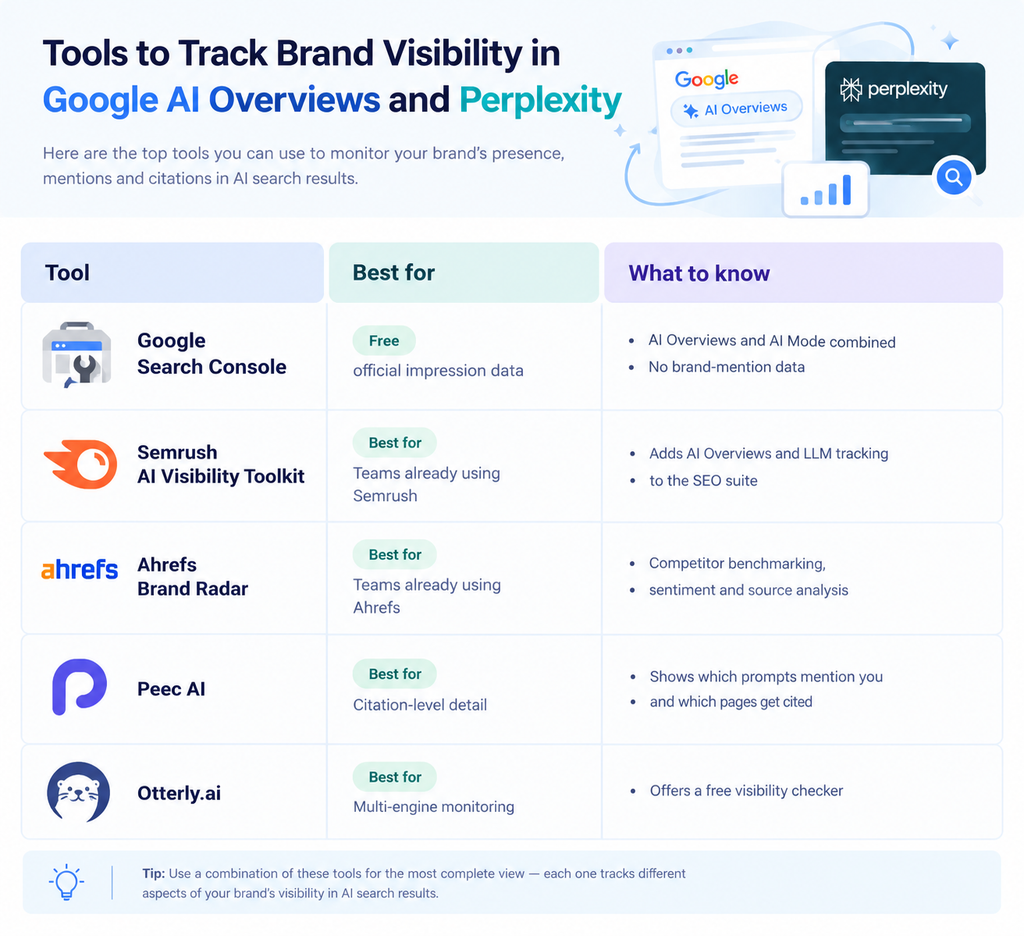
What to look for before you buy
- Engine coverage: at minimum, Google AI Overviews and Perplexity, plus ChatGPT and Gemini if your audience uses them.
- Citation-level data: you want to see the URLs being cited, not just a score.
- Competitor tracking: share of voice and source analysis against named rivals.
- History and export: monthly trends and easy reporting for your team or clients.
Common Mistakes to Avoid
Most teams stumble in the same few places when they start tracking. None of them are hard to fix once you know to look. Here are the ones worth watching for.
Treating one answer as the truth
AI answers vary. One screenshot, good or bad, isn’t a result. Run prompts several times and look at the rate.
Tracking only your own brand name
Branded prompts flatter you. Most new customers ask category questions, so make sure those make up a big share of your list.
Lumping every engine together
Google AI Overviews and Perplexity pick sources differently. Report them separately first, then combine only if it helps your team.
Counting visibility but ignoring accuracy
Being mentioned with the wrong price, an outdated feature, or a competitor’s description isn’t a win. Review how you’re described, not only whether you appear.
FAQs (Frequently Asked Questions)
How do I check if my brand appears in Google AI Overviews?
The quickest way is to search your target queries in an incognito window and see whether an AI Overview shows up. Then check if your brand is named or your site is cited. For a more reliable picture, check Search Console’s generative AI report, which shows impressions for your pages. Do both, and you’ll cover what you see and what Google reports.
Can I see which websites Perplexity cites?
Yes, and it’s one of Perplexity’s friendlier features. Every answer comes with numbered sources, so you can open the list and see exactly which domains were used. Run the same prompt a few times, since the sources can change between runs. Note whether your site appears, and which competitors or publishers show up instead.
Does Search Console show AI Overviews data?
It does now. Google added generative AI performance reports in June 2026, covering impressions in AI Overviews and AI Mode by page, country, date, and device. The catch is that the two are reported together, so you can’t split them. It also tracks your pages, not brand mentions, so you’ll still want to run manual checks or use a tool.
How often should I track AI search visibility?
Monthly is a sensible rhythm for manual checks, and weekly works well if a tool is doing the running. AI answers shift often, so a single check doesn’t tell you much. Keep the same prompt list each time so your numbers stay comparable. Look at the trend over a few months rather than reacting to one odd result.
How is AI search visibility tracking different from regular rank tracking?
Rank tracking gives you a single position for a single keyword. AI answers don’t have fixed positions, and they change from run to run. So you measure how often your brand is mentioned or cited across a set of prompts, then watch that rate over time. You’ll still want regular SEO tracking too, because strong rankings often feed AI visibility.
Conclusion
AI search visibility tracking doesn’t need to be complicated to be useful. Start with Search Console’s generative AI report, build a fixed list of prompts, check Google AI Overviews and Perplexity the same way, and write the results down every month. Add a tool when the spreadsheet starts to creak. The brands that get ahead here won’t be the ones with the fanciest dashboard. They’ll be the ones that measured early, compared fairly, and acted on what the cited pages were telling them.
Want a team to set up the tracking, read the results, and turn them into content that earns more citations? Talk to Myfirstad, the Best Creative Digital Marketing Agency in Delhi, and let’s make sure your brand shows up when AI answers the question.
